Modern technology touches virtually every dimension of our daily lives. From smartphones facilitating global communications to cloud servers powering streaming platforms, digital devices have transformed how we work, learn, and socialize. However, for newcomers entering the digital landscape, the rapid explosion of jargon, acronyms, and technical architectures can feel overwhelming. This foundational guide to technology for beginners breaks down essential computing principles into clear, actionable, and easy-to-understand concepts.
Whether you want to understand how computer processors calculate instructions, how wireless Wi-Fi routers transmit data across the internet, or how modern artificial intelligence generates answers, mastering technology for beginners provides the essential digital literacy needed to navigate the modern world with confidence.

Table of Contents
What Is Technology and Why Does It Matter?
At its core, technology refers to the practical application of scientific knowledge, engineering principles, and computational tools to solve problems, streamline workflows, and enhance human capabilities. A smartphone is technology, a laptop is technology, the internet network infrastructure is technology, and online banking platforms represent financial technology.
Technology does not need to be mysterious or frighteningly complex. Every sophisticated digital platform you encounter is composed of logical building blocks. By understanding these individual components through a structured approach to technology for beginners, anyone can transition from being a confused bystander to a knowledgeable and empowered digital user.
The Fundamental Difference Between Hardware and Software
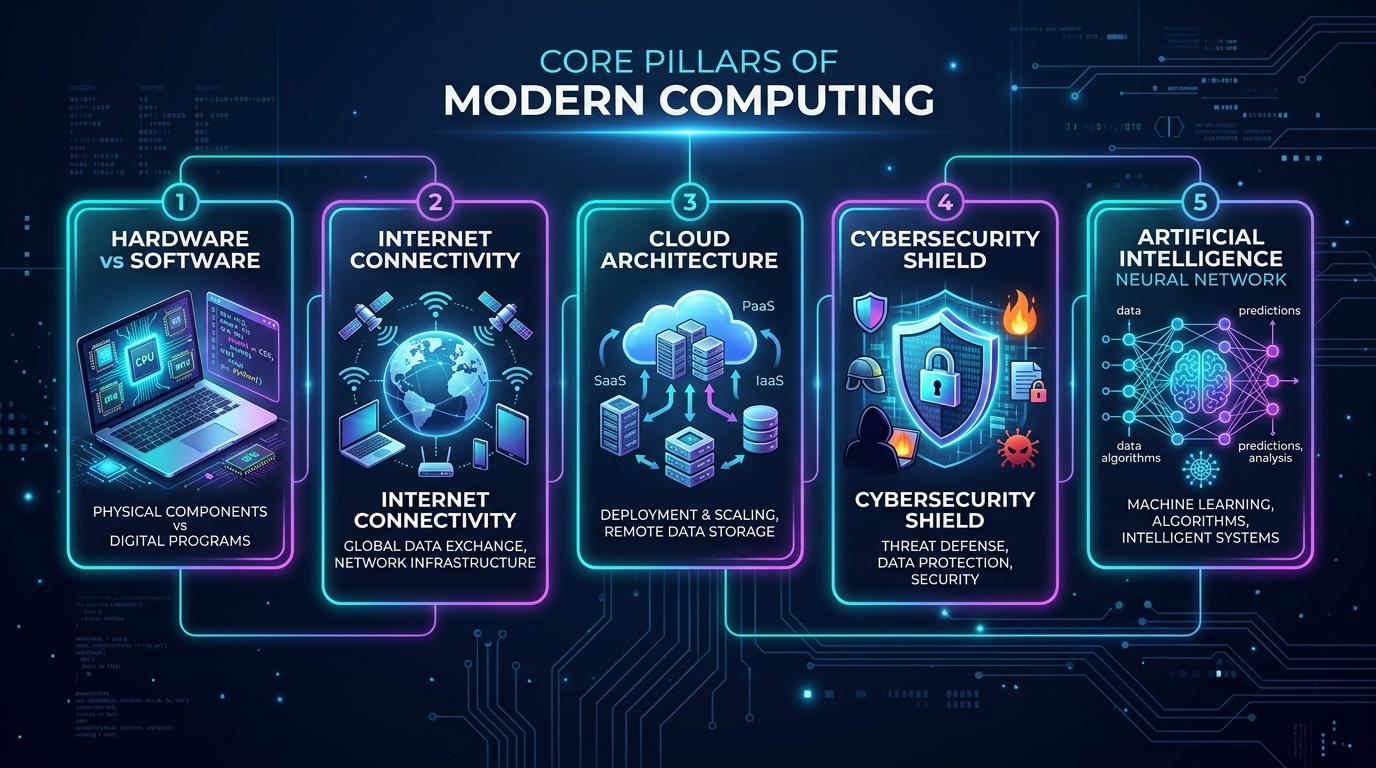
The first fundamental distinction every learner must grasp is the relationship between physical machinery and programmatic instructions. Every electronic device operates through a partnership between hardware and software.
Hardware represents the tangible, physical equipment that you can physically touch and inspect. Examples of computer hardware include:
- Central Processing Unit (CPU): The electronic brain executing binary computations.
- Random Access Memory (RAM): High-speed temporary memory holding active app data.
- Solid State Drive (SSD) / Hard Drive (HDD): Permanent long-term data storage.
- Input and Output Peripherals: Keyboards, computer mice, touchscreens, displays, cameras, and audio speakers.
- Power and Battery Systems: Rechargeable lithium-ion battery packs and power supply units.
Software consists of the intangible code, programs, algorithms, and operating routines that instruct the physical hardware on what operations to perform. As detailed in our comprehensive guide on types of software, software cannot run without hardware, and hardware remains inert and useless without software.
How Computers Process Information: CPU, RAM, and Storage
All computational devices—whether a pocket smartphone, a desktop workstation, or a massive cloud server—operate using the classic Information Processing Cycle: Input → Processing → Storage → Output.
When you open a webpage or launch a program, three primary internal hardware components coordinate the task:
- The Processor (CPU): The CPU fetches machine instructions, decodes them, and calculates results at billions of cycles per second (measured in Gigahertz or GHz). Modern chips feature multiple computing cores that divide processing tasks concurrently.
- Working Memory (RAM): RAM provides ultra-fast temporary storage for active operating system tasks and running applications. However, RAM is volatile memory; when power is switched off, any data stored in RAM is immediately cleared.
- Long-Term Storage (SSD / Flash Drive): Storage holds your operating system files, applications, documents, videos, and photos permanently. Unlike RAM, storage is non-volatile, retaining your data safely even after the device is shut down.
Understanding Operating Systems and Applications
An Operating System (OS) is the master control software that manages all device hardware, schedules computing tasks, controls security permissions, and provides the visual interface you interact with every day.
Major modern operating systems include:
- Microsoft Windows: The world’s most widespread desktop OS for business and gaming.
- Apple macOS & iOS: Apple’s secure, unified operating environments for Mac computers and iPhone devices.
- Google Android: The open-source mobile OS powering billions of smartphones worldwide.
- Linux: The rock-solid open-source operating system powering modern enterprise cloud servers, supercomputers, and web hosting platforms.
Applications (Apps) are specialized software programs built to run on top of an operating system to perform specific user tasks. Whether it is a web browser like Chrome, a productivity suite like Microsoft Word, or our recommended routines in our smartphone guide, applications translate complex computing into user-friendly digital tools.
How the Internet, Wi-Fi, and Web Browsers Work
Many beginners confuse the terms Wi-Fi, Internet, and World Wide Web. Understanding how these layers differ is a core pillar of technology for beginners:
- The Internet: A massive physical and wireless global network of connected computers, undersea fiber-optic cables, data centers, and routing switches. For a deep architectural breakdown, read our guide on how the internet works.
- Wi-Fi & Cellular Data: Wi-Fi is a local radio-frequency technology connecting your device to a local wireless router. Cellular data (4G/5G) connects your mobile device directly to telecom cell towers. Both technologies provide the local bridge connecting your hardware to the broader internet.
- The World Wide Web (Web): An information service operating on top of the internet. The Web consists of billions of interconnected web pages accessed via URLs (web addresses).
- Web Browsers: Client software (such as Google Chrome, Apple Safari, or Mozilla Firefox) that requests web pages from web servers via HTTP/HTTPS protocols and renders the code into visual interactive web pages.
Cloud Computing: Local Storage vs Cloud Storage
In traditional computing, all software and documents resided locally on your personal hard drive. Today, cloud computing allows users and businesses to store files, run applications, and manage databases across remote, highly secure data centers accessed over the internet.
As explored in our technical overview of cloud computing architecture, using cloud storage services (such as Google Drive, Microsoft OneDrive, or Apple iCloud) provides automatic multi-device synchronization and disaster recovery. If your laptop or smartphone is damaged or lost, your cloud-backed files remain safe and instantly recoverable on a new device.
Essential Cybersecurity and Digital Privacy Habits
As digital technology becomes central to daily finances, communications, and identity, cybersecurity is no longer optional. Following core safety protocols protects you against fraud, identity theft, and malicious software (malware).
Foundational security habits recommended in this technology for beginners guide include:
- Use Long, Unique Passwords with a Password Manager: Never reuse identical passwords across banking, email, and social accounts. Utilize a secure password manager to generate complex, uncrackable credentials.
- Activate Two-Factor Authentication (2FA): Enable multi-factor verification on all critical accounts. According to official security standards by the Federal Trade Commission (FTC), 2FA prevents unauthorized account takeovers even if a attacker obtains your password.
- Recognize Phishing Attempts: Never click on unsolicited email links or text messages claiming urgent banking suspensions. Always navigate directly to the official website. Learn more in our cybersecurity defense guide.
- Protect Your Personal Data Footprint: Limit app tracking permissions and review our actionable playbook on what is digital privacy.
- Install Operating System and Security Updates Immediately: Software patches eliminate critical vulnerabilities before hackers can exploit them.
Artificial Intelligence and Generative AI for Beginners
Artificial Intelligence (AI) represents software systems designed to perform complex cognitive tasks that historically required human intelligence—such as recognizing visual objects, translating foreign languages, analyzing medical scans, and making data-driven predictions.
Generative AI is a modern branch of artificial intelligence capable of synthesizing brand-new content based on user instructions (prompts). Systems like ChatGPT, Google Gemini, and Claude analyze massive datasets of text and code to generate articulate explanations, write software code, or summarize complex documents. To learn how neural models operate under the hood, explore our deep-dive on how generative AI works and review our curation of practical AI productivity tools.
Core Technology Concepts Comparison Matrix
To help solidify your conceptual understanding, this comparison table contrasts the most frequently confused computing terms introduced in this technology for beginners breakdown:
| Concept Pair | Primary Function | Key Characteristic | Typical Real-World Example |
|---|---|---|---|
| Hardware vs Software | Physical machinery vs digital instructions | Hardware is tangible; software is coded logic | Laptop motherboard vs Windows 11 OS |
| RAM vs SSD Storage | Temporary working memory vs permanent storage | RAM is volatile (fast); SSD is non-volatile (safe) | 16 GB active RAM vs 1 TB permanent SSD |
| Internet vs Web | Global network infrastructure vs information service | Internet connects computers; Web serves webpages | Undersea fiber cables vs Wikipedia website |
| Local vs Cloud | On-device execution vs remote server execution | Local works offline; Cloud enables multi-device sync | Saving file to Desktop vs Google Drive sync |
| Traditional vs Gen AI | Rule-based automation vs dynamic synthesis | Traditional follows scripts; Gen AI creates new content | Calculator software vs ChatGPT assistant |
A Practical Step-by-Step Technology Learning Roadmap
If you are starting from absolute zero, avoiding information overload is essential. Follow this structured 5-stage learning progression to master technology for beginners systematically:
- Phase 1 — Computer and Hardware Foundations: Master basic file management, keyboard shortcuts, peripheral connections, and system settings on your primary laptop or desktop PC (as supported by Microsoft Learn Computing Basics).
- Phase 2 — Internet and Networking Literacy: Learn how web browsers operate, configure secure home Wi-Fi passwords, and master cloud storage synchronization.
- Phase 3 — Security and Privacy Hardening: Configure a password manager, enable two-factor authentication on all email and banking accounts, and audit mobile app tracking permissions.
- Phase 4 — AI and Modern Productivity Tools: Experiment with generative AI assistants to draft emails, summarize lengthy articles, and automate routine repetitive computer tasks.
- Phase 5 — Specialized Tech Exploration: Once comfortable with foundational computing, explore advanced disciplines such as coding in Python, web development, cloud engineering, or data analytics based on your career interests.
Common Technology Mistakes Beginners Must Avoid
New technology users frequently fall into predictable operational traps that compromise device performance or digital safety. Be proactive and avoid these costly beginner mistakes:
- Ignoring Operating System and App Updates: Postponing firmware patches leaves your devices exposed to discovered security exploits.
- Saving Files in Single Unbacked Locations: Keeping irreplaceable family photos or tax documents on a single USB thumb drive risks total data loss if the drive fails. Maintain both local and cloud backups.
- Assuming Public Wi-Fi Networks Are Secure: Never conduct unencrypted banking or financial logins on open airport or coffee shop Wi-Fi without a trusted Virtual Private Network (VPN).
- Blindly Trusting All AI Outputs: While generative AI is remarkably capable, models can occasionally “hallucinate” incorrect facts. Always verify important technical, financial, or medical details independently.
- Overspending on Unnecessary Hardware: Avoid purchasing expensive enterprise workstations when everyday computing tasks only require moderate CPU cores, 16 GB of RAM, and fast SSD storage.
Frequently Asked Questions
Summary and Next Steps in Your Tech Journey
Mastering modern technology is an ongoing journey rather than a single destination. By understanding the core relationships between computer hardware, operating software, global internet networks, cloud storage infrastructure, and artificial intelligence, you have established a rock-solid foundation in technology for beginners.
Continue to practice safe digital habits, keep your operating systems updated, and experiment with new tools one concept at a time. With curiosity and practical application, technology transforms from a complex challenge into your greatest everyday superpower.
Continue expanding your digital capabilities: explore our curated guide on daily smartphone optimization, understand the essential fundamentals of cybersecurity and threat defense, or visit our About Us page to learn more about the Osmanix technical team!